Availability Set vs Availability Zone vs Proximity Placement Group

Recently I have been working on a solution where specific application requirement sub-millisecond latency between tier workloads. At the same time, there has been a need for redundancy to ensure High Availability (HA) or Fail-over is being taken care of. Since Hyperscallers (AWS first to start then Azure followed recently and GCP had it natively and another cloud provider) has come up with Availability Zone (AZ) based (Software Define Networking (SDN) which connect different site within the same city or proximity) offering, solutions are being design taking it as defacto HADR solution.

While AZ is a cool feature and gives us flexibility and mitigate risk/cost of running parallel environment across different location, there are still some minor level things which are often being ignored. Some of those observations, I believe are following;

  • AZ is never a native HADR solution, it is us who treat them as HADR
  • AZ operate within the vicinity of city boundary (generally), which mean the environment is still exposed to a single point of failure.
  • By Placing workload across AZ, we only add extra latency within the landscape because the request is hopping across different sites.
  • Different Hyperscaller operates AZ differently, thus automation will be difficult to unify. Example: AWS AZ can be dictated by Subnet within VPC, GCP AZ can be dictated by Subnet but their VNET span across the region, Azure AZ cannot be dictated via Subnet within VNET.

So thought of checking it, actually how workload behaves in a different tier or different scenario behave. I choose platform as Azure to test as Azure is the latest entrant in AZ concept and very recently they have also come up with Proximity Placement Group (something similar to AWS Placement Group). Here are some of the findings when I performed basic PING Test across;

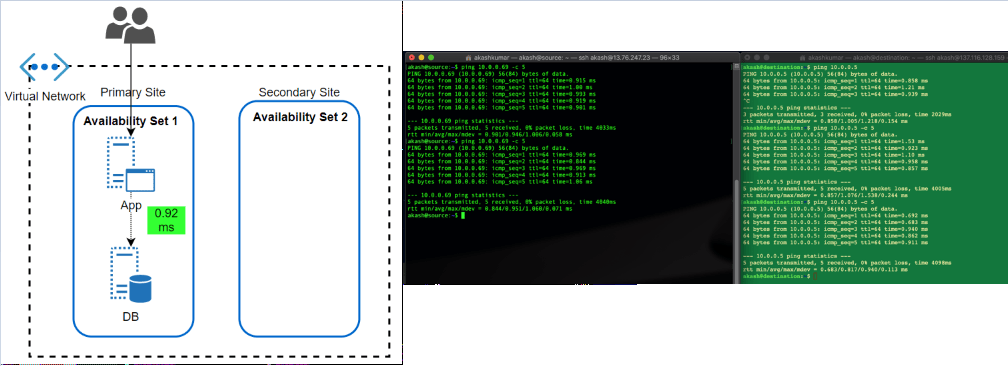
  • Availability Set: This feature has been almost since the inception of VM in Azure offering. An Availability Set is a logical grouping capability for isolating VM resources from each other when they’re deployed. The main purpose is to ensure workload run across different physical servers ‘with-in’ same datacentre and no single point of failure at the physical facility side. 

The feature has been great in overcoming automatic updates, when they pushed or if Microsoft itself want to update something at Fabric level. Since the environment get restricted within a single physical site, the performance of workload, in terms of latency, has always been better.

After the launch of AZ, what I can’t find if workload protected by Availability Set, spread across different AZ automatically. Because neither we get an option to choose AZ when opting for availability set nor subnet within VNET allow them to define as per AZ.

Latency Test Results: A workload running in two different subnets but part of an Availability set, talk within 1 ms (average 0.92ms, I found in my test)
  • Availability Zone: Availability Zone has been introduced by Azure in approximate 1 year back. In my opinion, it was a feature which is yet not fully available across all region but Microsoft is working rapidly to offer it across all offered region as well as mature this offering itself (check my next section why I am saying this). I believe that competition has caused a lot of damage is gaining market by marketing AZ while ‘Region Pair’ (Azure way of HADR, which I believe is true DR) did not work out in price & operational sensitive market. 

AZ should be treated with case (if someone coming from strong AWS background) because it is being operational a bit different. Here Workload is to be dictated which AZ, it should sit. Virtual Network’s subnet span across AZ’s in the region.

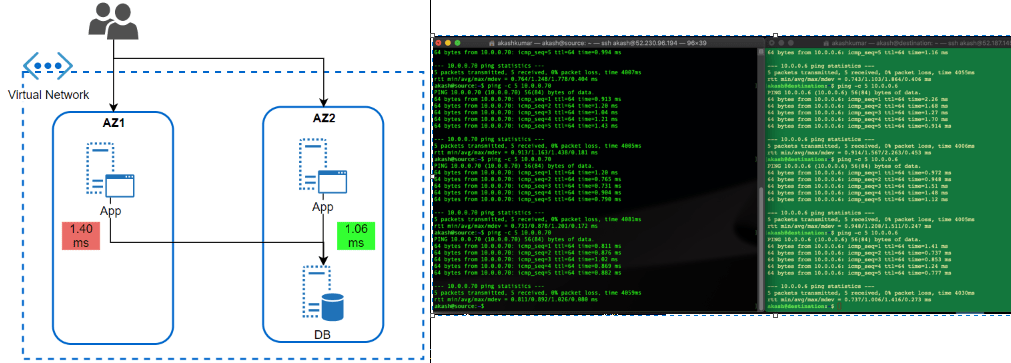
I wanted to test how much latency does it take for a workload running in AZ to different AZ. This is a very common scenario of workload when APP tier Server is operated across different Azs and DB too. But, DB (RDMS) are single write tier, all queries to write should to a DB instance-specific running in AZ specific.

Latency Test Results: Workload talking across AZ is talking almost 0.40 ms more than workload running (1.40ms) within the same AZ. While the difference is not much, but think differently. It is almost 40% delay than within AZ, what if transaction getting processed together by users operating in sessions together in both AZ’s App tier workloads. It would cause some issue. Same goes with the very latency-sensitive workload. What is more interesting that I could not find any hyperscaller giving any commitment to latency between AZ. Thus, it is the architect problem to solve it before it becomes bigger problem post-production.  
  • Availability Zone with Proximity Placement Group: Availability Set has been the well-proven solution to bring redundancy within DC, AZ has enhanced it to bring additional level redundancy within the region, still there were some open areas where thing was to be looked such that balance is being maintained between performance and redundancy. 

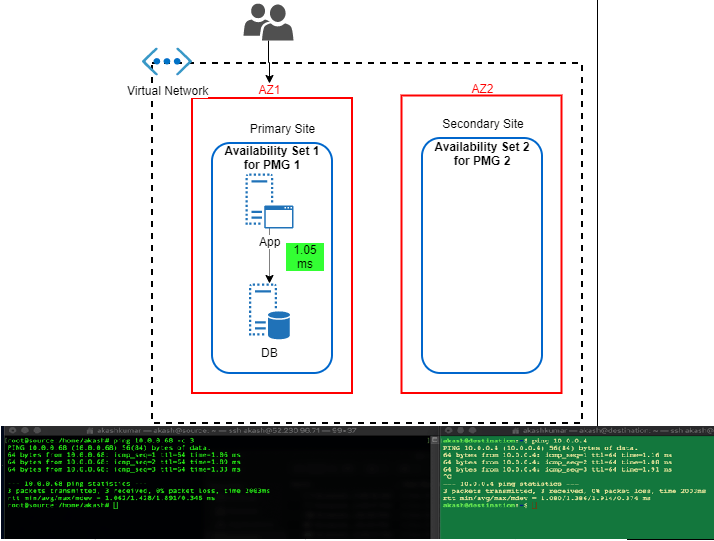
I believe couple of month only back Azure has come up with Proximity Placement Group. It is quite cool feature because it tries to bring best of both (from above) i.e. Availability Sets and Availability Zones. We can hook any existing Availability to Proximity Placement Group (PPG), thus we can drive deployment to AZ specific. In this case, we’ll have different availability set with PPG for each AZ. I found KB article by Microsoft focuses a lot on using PPG in specific to SAP landscape deployment. It is quite relevant for such legacy type application which sensitive to the nearness of different tier. Only glitches (I am sure soon it will overcome that) these all operation are to be done via PowerShell scripting and well planning should be in place before execution.

Latency Test Results: In this case, performance definitely picked up. It hit on average 1.05ms
So here are the final summaries result of test;

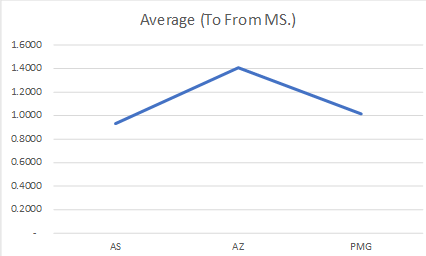
Latency ScenarioSource to Destination (ms)Destination to Source (ms)Average (To From ms)
AS                                   0.9485                                   0.9110                            0.9298
AZ                                   1.4280                                   1.3860                            1.4070
PMG                                   0.9777                                   1.0545                            1.0161
Overall Results
Final Analysis

In the end, I want to say what I have shared above was just thing which I wanted to see by myself and have a number attached to it. Thus, I can see how different it can make. Seeing these test result, things are much clearer to me and when I went for solutions specific problem, these pointer can be a guiding principle to move ahead.

2019: personal learning index

I am firm believer that learning should never stop. No one is perfectionist, No one can learn everything, but one must keep on trying hard to learn new things/trend/technology.

On my personal learning index, 2018 was focus on building base for AWS similarly 2019 went for building base for GCP. I have Azure practitioner since 2012, therefore for last few years on Azure i have moved focused from traditional IaaS to PaaS/CICD as well as Data/AI.

Learning is of no use if we don’t apply in day-to-day life. Thanks to my job, where i get almost every requirement as new requirement. Thus, every solution i build not only allow me to use my learning but also push me further to explore and learn more.

I have tried to collate my learning KPI which i have achieved in last year 2019. Using this as based, i shall move forward in 2020. Like in sales target will keep on increasing YoY or QoQ, similarly self-target be it learning or knowledge should keep in increase.

AzureAWSGCPTOGAF
Platform utilized for learning and off-course a ton of native documentation read (nothing beats that)Linux Academy, Microsoft Learn, EDXLinux Academy, EDX, AWS QuickstartLinux Academy, Qwiklabs, Coursera, Togaf Online Guide, Udemy course on Togaf
Unique Course Focuses
Designing and Build IOT Solution, Security, DevOps Developing Solution on AWS (PaaS side), DevOps (CICD using AWS native)
GCP PCA, Hybrid Networking, Network Specialization,
Time Spent in Online Courses (hours) 20+6+60+75+
Labs Attempted15+25+50+More of day to day Practice learning, specially ADM Guidelines & Techniques
Boot-camp AttendedSAP HANA on Azure (onsite)
Designing & Building AI Solution using Azure Cognitive Services
First focus was building base
Certification AchievedAZ 300
AZ900
AZ103
GCP-PCA,Togaf 9
Next Steps for 2020AZ 301AWS 2 Specialty (prefer Security and Networking)GCP-Network Professional (this one already failed once & clueless why despite 100% sure on 84% answers) and SecurityEnhance Practicality of Togaf in daily operation

My personal favorite has been and will always be ‘labs‘. Unless you get your hands dirty in implementing the solution, you can not learn from Online course or documentations. Thus, i chose platform to learn which can give me lot of labs to performs.

Such matrix help me to keep me laser focused on goal. In fact, i have built a mind-map chart which also helps me to build my learning path without focusing too much too many things.

At last, I am not at all firm believer of certifications. But, unfortunately on this basis, this is what Industry recognize you as expert, only after you are certified on xyz with abc specialty. Therefore, it is wise to have these badges but do not compromise on true learning/knowledge.

I tried to collate things and share it with you all as an experience so that you may try to replicate something similar for your learning journey. Most of you may be already expert on domain, thus find it very basic but it might be helpful for someone which may have not started such journey yet.

Thank You and Happy New Year 2020 !!!

Hybrid Networking using AWS VPC Peering and Client VPN

Last Holiday, I spent in getting hands dirty bout IOT, Edge, Analytics. This extended weekend, I decided to brush up my skills again on Cloud core component i.e. ‘Networking’.

SDN (software defined networking) is the backbone of any cloud platform. Whoever makes it simple to use/manage/secure is the king of cloud platform. This is why AWS is having advantage till now on cloud platform. Azure is definitely maturing day by day, in fact some area they are now leading like simplifying ‘Resource Group’ based design, SLA are ExpressRoute/VPN level, having their own network backbone across regions.

This time, I tested scenario where I was having three different VPC in AWS, all of them running for different purpose.

  1.  VPC1: My core production workload running
  2. VPC2: Supported workload for my core production working like internet facing, file share etc.
  3. VPC3:  My management environment where I as syops/devops only have access.

HLD

Ask for environment;

  • VPC1 should not be explicitly allowed access to VPC3 or VPC2, even SysOps/DevOps operation should be restricted and should not have explicit access at all.
  • VPC 3 should not be explicitly allowed access to VPC2.
  • Having limited or negligible connectivity among all VPCs
  • Mechanism to have secure access for sysops without opening or bringing them on network. Option to record their access.

Solution;

  • Three VPC with different CIDR, obviously we can’t have CIDR overlap (basic thumb rule) if we want to establish some level of connectivity among them or establish hybrid networking
  • Every VPC having their own Subnet
  • Each VPC Subnet having their our Route Table, defining clear communication between source and target;
    • VPC: 10.1.0.0/16
      • Subnet: 10.1.0.0/24
        • Route table:
          • Route Table 1
            • Destination: 10.1.0.0/16
            • Target: Local
          • Route Table 2 (if public subnet)
            • Destination: 0.0.0.0/0
            • Target: igw (internet gateway of their respective VPC)
      • Security Group
  • Between VPC1 and VPC2, build VPC Peering. In AWS, building this is very simply. Few clicks under Peering connection under VPC section, defining requester and acceptor, authorization. What is more important post peering is updating ‘Route Table’ w.r.t. Communication flow to Target via Mode.
    • Example: VPC 1 (10.1.0.0/16) talking to VPC 2 (10.2.0.0/16)
      • Route table post Peering should be updated as
        • Destination: 10.2.0.0/16
        • Target: peering connection id (pcx)
      • Vice versa from VPC 2 to VPC1
    • If we do one side only then connectivity would be only one way
  • Interestingly we could have used VPC Peering between VPC 1 and VPC 3 again. But, is this wise or practical? Because most often in enterprises, Sysops/DevOps would be performed by group of people/team/vendors. Customer wants to give limited access, want to monitor how connections, how much traffic, not to allow direct entry, secured access, allow to block access any point of time etc. To solve all this problem, ‘Client VPN Endpoint‘ is the best solution without compromising on security and open network even to service providers.
    • Build Client VPN Endpoint (CPVN) inside VPC which you want to give access from. Chose as CIDR which you can be way isolate and would not be require in future. More guidance is available on AWS Docs.
    • V Imp, you can’t proceed with it unless you have Client and Server Certificate in place. If you intend to use solution like ‘OpenVPN’ through which Bastion would connect, then it is must to create Server Key/Certificate and Client Key/Certificate prior proceeding with above steps. CVPN Endpoint can only allow secure authentication only if Secure TLS Certificate ARN used by the server. And to do this, you need to provision this prior using AWS Certificate Manager (ACM). It is long steps and probably I can cover with steps by steps in coming blogs.
    • After this, chose DNS and Transport protocol TCP and CVPN endpoint is ready.

Then, go to Association and ‘Associate’ it to the VPC which you want to connect i.e. VPC1. After this, modify security and again under Associations tab, apply Security group which is not default so that instance level security rule can be followed. At last, under Authorization table, Authorize ingress to destination VPC CIDR 10.1.0.0/16. Once active, we are good to go.

Basically, what we need to do create a subnet under VPC1 which will have CPVN endpoint which would authenticate against Client – Server based certificate authentication and allow only authenticated traffic via this path. Since VPN client is between, we can limit remote concurrent connection. Using CPVN endpoint, we can keep track/log of all access/activities in Cloud Trail.

  • Run command inside Instance where VPN client is going to work aws ec2 export-client-vpn-client-configuration –client-vpn-endpoint-id  –output text>client-config.ovpn
  • After this modify the config file with your client certificate and key details so that when you run invole your VPN client such as OpenVPN it invokes against those.
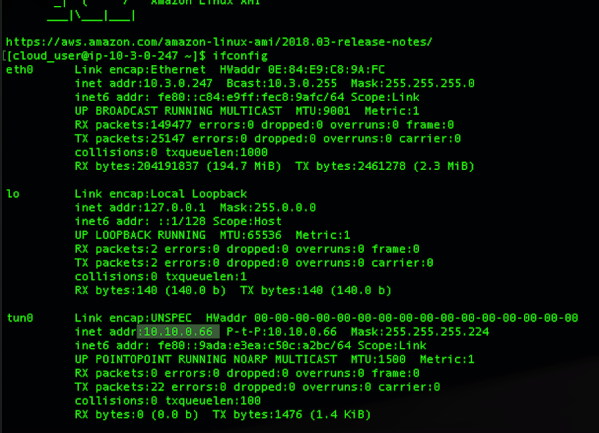
  • All this done, when you try to connect VPC1 from VPC3 from Bastion Client via VPN instance and run command such as (sudo openvpn –config client-config.ovpn) you would notice that it gets connected using certificate authentication. Also inside your AWS management console you would notice number of connection, data transfer packet size etc. details.

You can see how Client VPN Endpoint is granting IP from CIDR assigned to it.

Command Output CVPNE

Inside Client VPN Endpoint you can notice connection Active any point of time and take action on top it.

CVPNE Console

  • In order you want to extend this connectivity VPC 2 also, then just ‘Authorize Ingress’ to VPC 2 CIDR 10.2.0.0/16 and if internet via VPC2 (like we do via NAT Gateway) add one more ingress 0.0.0.0/0. Also add route table for destination 10.2.0.0/16 with target VPC1 Subnet similarly for 0.0.0.0/0 for.

Tools Used;

  • Nothing works better than simple blank paper and pencil. Simulate your scenario, draw your flow, route then go inside AWS panel and replicate those. Or I may be old school boy 🙂

Prep

  • Terminal on Mac. It is best things since I switched and made things a lot easy than installing lot of dependencies and keep on updating sub-systems
  • Draw.io for designing final architecture
  • And obviously free tier of AWS environment.

Note: This is just a humble effort to learn and share knowledge. Should there be any suggest please feel free to drop me your message, so that i can look into those.