Azure Container Monitoring for Azure Kubernetes Services (AKS) is a vital aspect that varies from one deployment to another. Although enabling AKS Diagnostics Settings and sending logs to a Log Analytics Workspace might seem like enough, there are still a few moving parts to consider. In this blog post, we will discuss the importance of Container Insight and how to automatically and efficiently onboard it for any cluster.
First and Foremost, let me put ways of monitoring AKS Cluster and it’s component;
- Container Insight (Workload Metrics/Logs)
- AKS Control Plan Logs (Diagnostics Logs)
- Prometheus Logs (New Offering)
In this post, I am going to cover `Container Insight` using Azure Monitor Agent (AMA). It is recommended that any AKS cluster should have it deployed as must, best practice. To deploy this, you need;
- Log Analytics Workspace where you will send logs/metric to
- User Managed Identity (Best Practice for Remediation Task) , Else System Assigned Managed Identity
- Enable Add-On for Monitoring (Azure Monitoring Agent Container)
You can onboard any cluster with Container Insight as part of deployment by using a provided configuration. Alternatively, you could use Azure Policy to do it for you. In this blog post, we will show you how to automatically and efficiently onboard Container Insight for any cluster, using standardized configurations.
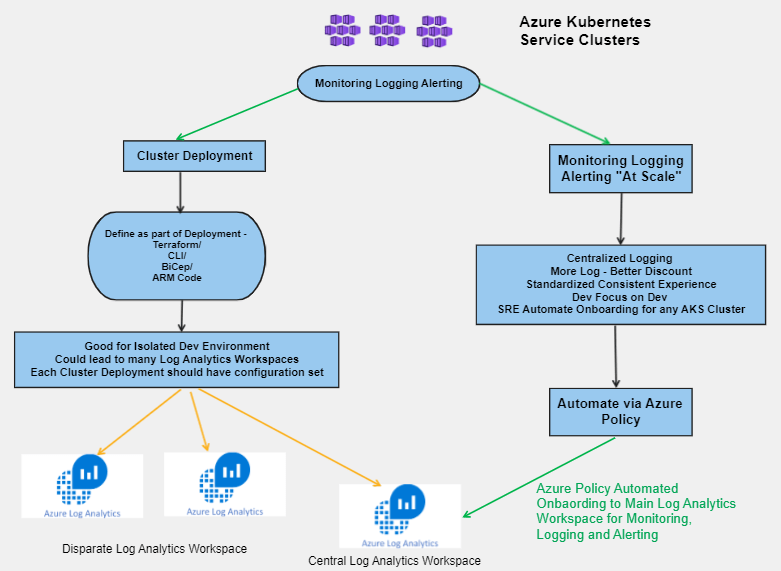
Have a review of demo which is covering scenario;
Key things and policy code,
- Azure Policy to Onboard Container Insight – cloud_governance_monitoring/Azure/Monitoring/AKS_Monitoring_At_Scale_AMAConainerInsight at main · spotakash/cloud_governance_monitoring (github.com)
- Some good documentation –
- Container Insights: https://learn.microsoft.com/en-us/azure/azure-monitor/containers/container-insights-overview
- Container Insight via Azure Policy: https://learn.microsoft.com/en-us/azure/azure-monitor/containers/container-insights-enable-aks-policy
- KQL Queries https://learn.microsoft.com/en-us/azure/azure-monitor/containers/container-insights-log-query#resource-logs
- Sample Code parameter for TF and CLI
- Validation Command and sample output if it is deployed
- Kubectl get event for validation command
- Kubectl valiation command
This is a personal experience sharing post that will provide you with practical insights on how to get started with Container Insight for AKS cluster monitoring. Don’t hesitate to take advantage of this best practice and ensure the performance and health of your Kubernetes cluster and container workloads. Also, please feel free to add your comment. Please note, technology keep changing at rapid pace. Don’t be surprised we shall have better alternatives.
Coming blog posts, I may cover following topics;
- AKS Monitoring using Managed Prometheus and Managed Grafana at Scale
- AKS Diagnostic Monitoring at Scale
- AKS all Monitoring using ALZ Terraform Module Custom Policy Extension
- How to have AKS Enterprise Wide Dashboards for Central Monitoring




 Cloud Gyan