In an era where developer efficiency is paramount, DevBox emerges as a game-changer. Offering not only competitive pricing and performance, DevBox grants developers the unparalleled freedom to operate on Desktop as a Service (DaaS) without the traditional administrative restrictions on utilities and extensions.
However, freedom must be balanced with security. To ensure a secure and productive environment, consider implementing the following configurations:
Essential Configurations for DevBox
- Single Sign-On (SSO) to EntraID: Simplify access management and enhance security with SSO integration.
- Device Management: Utilize Intune or other MDM/MAM solutions to track and enforce device posture.
- Regular OS Updates and Patching: Ensure operating systems are consistently updated and patched.
- Application Control: Monitor and manage potentially risky applications.
- Standardized OS Images: Use corporate-standard OS images, incorporating necessary security utilities from the Azure Compute Gallery, and ensure regular refreshes.
- Limit DevBox Count: Restrict the number of DevBoxes per developer to manage resources effectively.
- Auto-stop Configuration: Implement auto-stop for DevBoxes during non-operational hours to optimize usage.
- Network Deployment: Deploy DevBoxes within your organization’s network to enable access to corporate resources and allow network traffic inspection by corporate security devices.
Guidance for Restricted Internet Connectivity
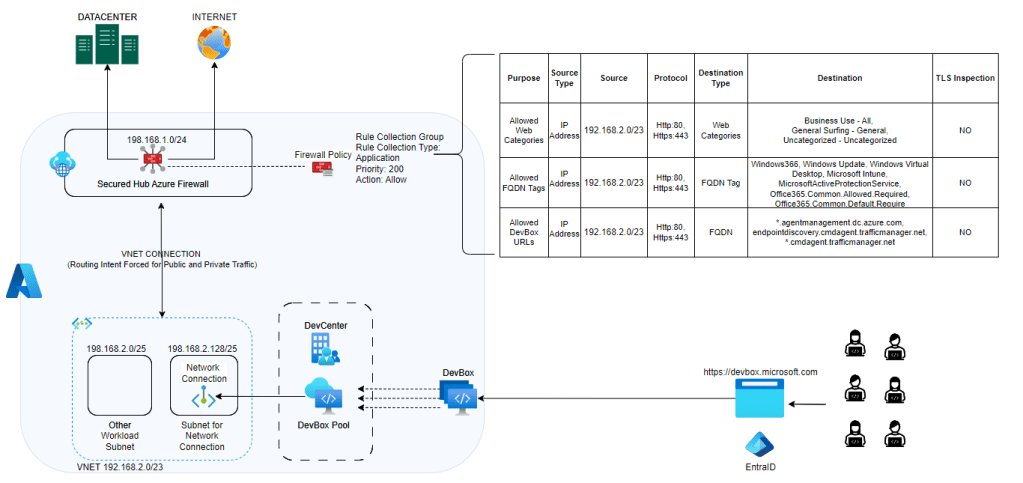
For secure yet flexible internet connectivity on DevBox, it’s crucial to configure your network correctly. Implementing SecuredHub, NVA, or any firewall device will disable public network connectivity by default. This ensures security without compromising developer productivity. However, to maintain the health of DevBox, allow access to its necessary URLs and service tags.
Configuration Patterns for Azure Firewall Policy Application Rule
Pattern 1: Using Azure Firewall in Secured Hub
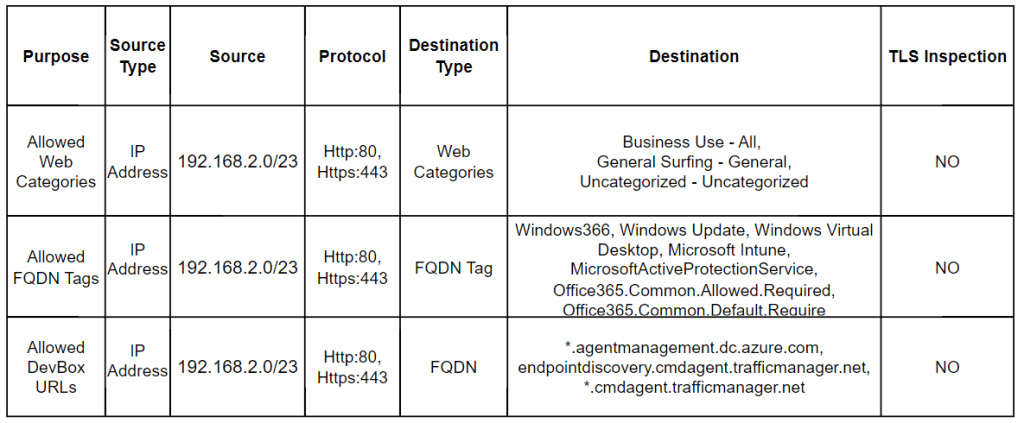
- Web Categories Whitelisting: Control internet connectivity by whitelisting specific web categories.
- Allowed FQDN Tags: Essential for network requirements of DevBox and Windows 365. Without these, you risk unhealthiness, errors, or broken access.
- Allowed DevBox URLs: Facilitate Azure Network Connection (ANC) health checks to prevent deployment failures or errors. Refer to [URL] for required endpoints.
Pattern 2: Traditional Virtual Network Hub
If avoiding exposure of Azure Firewall Public IP due to SNAT port exhaustion or other reasons, incorporate Azure NAT Gateway. This component handles public outbound requests, ensuring scalability and avoiding SNAT portal issues, while preventing exposure of Azure Firewall IP.

Embrace these configurations to leverage the full potential of DevBox, striking a balance between developer freedom and robust security. DevBox is not just a tool; it’s a revolution in developer productivity and operational efficiency.
 Cloud Gyan