Recently I have been working on a solution where specific application requirement sub-millisecond latency between tier workloads. At the same time, there has been a need for redundancy to ensure High Availability (HA) or Fail-over is being taken care of. Since Hyperscallers (AWS first to start then Azure followed recently and GCP had it natively and another cloud provider) has come up with Availability Zone (AZ) based (Software Define Networking (SDN) which connect different site within the same city or proximity) offering, solutions are being design taking it as defacto HADR solution.
While AZ is a cool feature and gives us flexibility and mitigate risk/cost of running parallel environment across different location, there are still some minor level things which are often being ignored. Some of those observations, I believe are following;
- AZ is never a native HADR solution, it is us who treat them as HADR
- AZ operate within the vicinity of city boundary (generally), which mean the environment is still exposed to a single point of failure.
- By Placing workload across AZ, we only add extra latency within the landscape because the request is hopping across different sites.
- Different Hyperscaller operates AZ differently, thus automation will be difficult to unify. Example: AWS AZ can be dictated by Subnet within VPC, GCP AZ can be dictated by Subnet but their VNET span across the region, Azure AZ cannot be dictated via Subnet within VNET.
So thought of checking it, actually how workload behaves in a different tier or different scenario behave. I choose platform as Azure to test as Azure is the latest entrant in AZ concept and very recently they have also come up with Proximity Placement Group (something similar to AWS Placement Group). Here are some of the findings when I performed basic PING Test across;
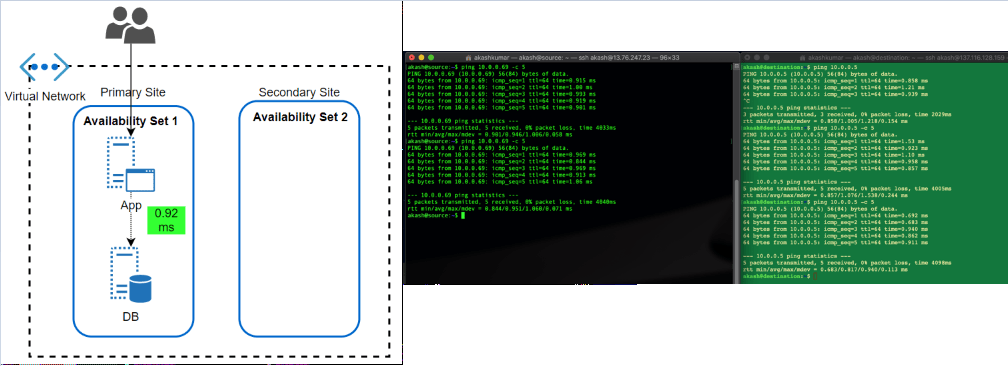
- Availability Set: This feature has been almost since the inception of VM in Azure offering. An Availability Set is a logical grouping capability for isolating VM resources from each other when they’re deployed. The main purpose is to ensure workload run across different physical servers ‘with-in’ same datacentre and no single point of failure at the physical facility side.
The feature has been great in overcoming automatic updates, when they pushed or if Microsoft itself want to update something at Fabric level. Since the environment get restricted within a single physical site, the performance of workload, in terms of latency, has always been better.
After the launch of AZ, what I can’t find if workload protected by Availability Set, spread across different AZ automatically. Because neither we get an option to choose AZ when opting for availability set nor subnet within VNET allow them to define as per AZ.
Latency Test Results: A workload running in two different subnets but part of an Availability set, talk within 1 ms (average 0.92ms, I found in my test)
- Availability Zone: Availability Zone has been introduced by Azure in approximate 1 year back. In my opinion, it was a feature which is yet not fully available across all region but Microsoft is working rapidly to offer it across all offered region as well as mature this offering itself (check my next section why I am saying this). I believe that competition has caused a lot of damage is gaining market by marketing AZ while ‘Region Pair’ (Azure way of HADR, which I believe is true DR) did not work out in price & operational sensitive market.
AZ should be treated with case (if someone coming from strong AWS background) because it is being operational a bit different. Here Workload is to be dictated which AZ, it should sit. Virtual Network’s subnet span across AZ’s in the region.
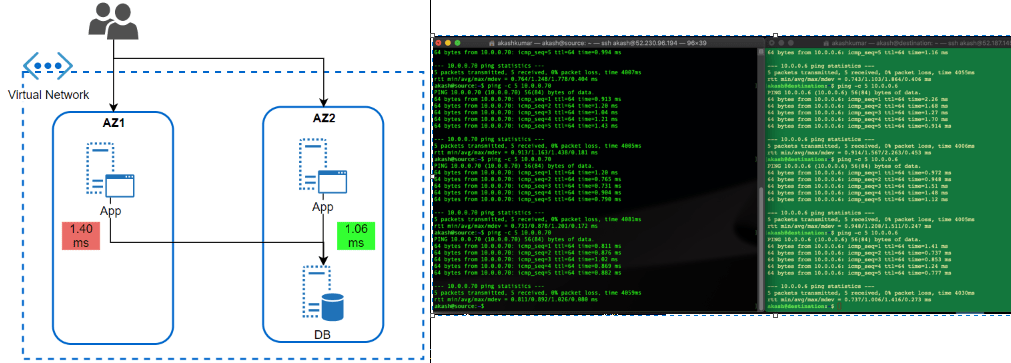
I wanted to test how much latency does it take for a workload running in AZ to different AZ. This is a very common scenario of workload when APP tier Server is operated across different Azs and DB too. But, DB (RDMS) are single write tier, all queries to write should to a DB instance-specific running in AZ specific.
Latency Test Results: Workload talking across AZ is talking almost 0.40 ms more than workload running (1.40ms) within the same AZ. While the difference is not much, but think differently. It is almost 40% delay than within AZ, what if transaction getting processed together by users operating in sessions together in both AZ’s App tier workloads. It would cause some issue. Same goes with the very latency-sensitive workload. What is more interesting that I could not find any hyperscaller giving any commitment to latency between AZ. Thus, it is the architect problem to solve it before it becomes bigger problem post-production.
- Availability Zone with Proximity Placement Group: Availability Set has been the well-proven solution to bring redundancy within DC, AZ has enhanced it to bring additional level redundancy within the region, still there were some open areas where thing was to be looked such that balance is being maintained between performance and redundancy.
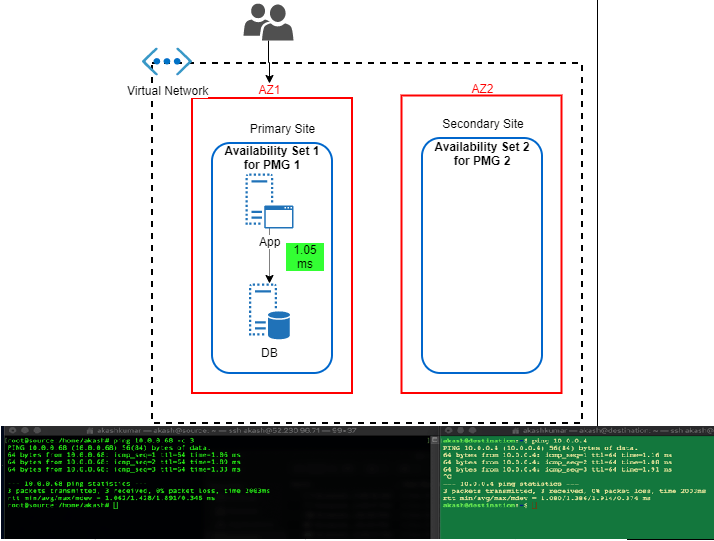
I believe couple of month only back Azure has come up with Proximity Placement Group. It is quite cool feature because it tries to bring best of both (from above) i.e. Availability Sets and Availability Zones. We can hook any existing Availability to Proximity Placement Group (PPG), thus we can drive deployment to AZ specific. In this case, we’ll have different availability set with PPG for each AZ. I found KB article by Microsoft focuses a lot on using PPG in specific to SAP landscape deployment. It is quite relevant for such legacy type application which sensitive to the nearness of different tier. Only glitches (I am sure soon it will overcome that) these all operation are to be done via PowerShell scripting and well planning should be in place before execution.
Latency Test Results: In this case, performance definitely picked up. It hit on average 1.05ms
So here are the final summaries result of test;
| Latency Scenario | Source to Destination (ms) | Destination to Source (ms) | Average (To From ms) |
| AS | 0.9485 | 0.9110 | 0.9298 |
| AZ | 1.4280 | 1.3860 | 1.4070 |
| PMG | 0.9777 | 1.0545 | 1.0161 |
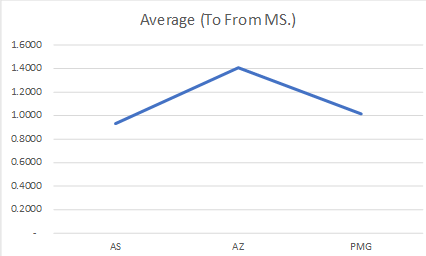
In the end, I want to say what I have shared above was just thing which I wanted to see by myself and have a number attached to it. Thus, I can see how different it can make. Seeing these test result, things are much clearer to me and when I went for solutions specific problem, these pointer can be a guiding principle to move ahead.
 Cloud Gyan