Last Holiday, I spent in getting hands dirty bout IOT, Edge, Analytics. This extended weekend, I decided to brush up my skills again on Cloud core component i.e. ‘Networking’.
SDN (software defined networking) is the backbone of any cloud platform. Whoever makes it simple to use/manage/secure is the king of cloud platform. This is why AWS is having advantage till now on cloud platform. Azure is definitely maturing day by day, in fact some area they are now leading like simplifying ‘Resource Group’ based design, SLA are ExpressRoute/VPN level, having their own network backbone across regions.
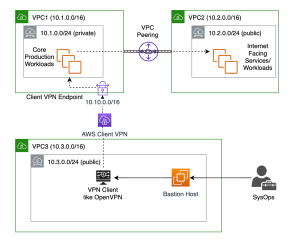
This time, I tested scenario where I was having three different VPC in AWS, all of them running for different purpose.
- VPC1: My core production workload running
- VPC2: Supported workload for my core production working like internet facing, file share etc.
- VPC3: My management environment where I as syops/devops only have access.
Ask for environment;
- VPC1 should not be explicitly allowed access to VPC3 or VPC2, even SysOps/DevOps operation should be restricted and should not have explicit access at all.
- VPC 3 should not be explicitly allowed access to VPC2.
- Having limited or negligible connectivity among all VPCs
- Mechanism to have secure access for sysops without opening or bringing them on network. Option to record their access.
Solution;
- Three VPC with different CIDR, obviously we can’t have CIDR overlap (basic thumb rule) if we want to establish some level of connectivity among them or establish hybrid networking
- Every VPC having their own Subnet
- Each VPC Subnet having their our Route Table, defining clear communication between source and target;
- VPC: 10.1.0.0/16
- Subnet: 10.1.0.0/24
- Route table:
- Route Table 1
- Destination: 10.1.0.0/16
- Target: Local
- Route Table 2 (if public subnet)
- Destination: 0.0.0.0/0
- Target: igw (internet gateway of their respective VPC)
- Route Table 1
- Route table:
- Security Group
- Subnet: 10.1.0.0/24
- VPC: 10.1.0.0/16
- Between VPC1 and VPC2, build VPC Peering. In AWS, building this is very simply. Few clicks under Peering connection under VPC section, defining requester and acceptor, authorization. What is more important post peering is updating ‘Route Table’ w.r.t. Communication flow to Target via Mode.
- Example: VPC 1 (10.1.0.0/16) talking to VPC 2 (10.2.0.0/16)
- Route table post Peering should be updated as
- Destination: 10.2.0.0/16
- Target: peering connection id (pcx)
- Vice versa from VPC 2 to VPC1
- Route table post Peering should be updated as
- If we do one side only then connectivity would be only one way
- Example: VPC 1 (10.1.0.0/16) talking to VPC 2 (10.2.0.0/16)
- Interestingly we could have used VPC Peering between VPC 1 and VPC 3 again. But, is this wise or practical? Because most often in enterprises, Sysops/DevOps would be performed by group of people/team/vendors. Customer wants to give limited access, want to monitor how connections, how much traffic, not to allow direct entry, secured access, allow to block access any point of time etc. To solve all this problem, ‘Client VPN Endpoint‘ is the best solution without compromising on security and open network even to service providers.
- Build Client VPN Endpoint (CPVN) inside VPC which you want to give access from. Chose as CIDR which you can be way isolate and would not be require in future. More guidance is available on AWS Docs.
- V Imp, you can’t proceed with it unless you have Client and Server Certificate in place. If you intend to use solution like ‘OpenVPN’ through which Bastion would connect, then it is must to create Server Key/Certificate and Client Key/Certificate prior proceeding with above steps. CVPN Endpoint can only allow secure authentication only if Secure TLS Certificate ARN used by the server. And to do this, you need to provision this prior using AWS Certificate Manager (ACM). It is long steps and probably I can cover with steps by steps in coming blogs.
- After this, chose DNS and Transport protocol TCP and CVPN endpoint is ready.
Then, go to Association and ‘Associate’ it to the VPC which you want to connect i.e. VPC1. After this, modify security and again under Associations tab, apply Security group which is not default so that instance level security rule can be followed. At last, under Authorization table, Authorize ingress to destination VPC CIDR 10.1.0.0/16. Once active, we are good to go.
Basically, what we need to do create a subnet under VPC1 which will have CPVN endpoint which would authenticate against Client – Server based certificate authentication and allow only authenticated traffic via this path. Since VPN client is between, we can limit remote concurrent connection. Using CPVN endpoint, we can keep track/log of all access/activities in Cloud Trail.
- Run command inside Instance where VPN client is going to work aws ec2 export-client-vpn-client-configuration –client-vpn-endpoint-id –output text>client-config.ovpn
- After this modify the config file with your client certificate and key details so that when you run invole your VPN client such as OpenVPN it invokes against those.
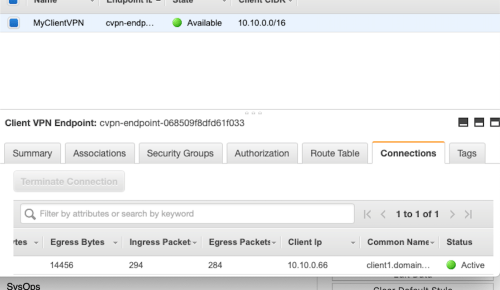
- All this done, when you try to connect VPC1 from VPC3 from Bastion Client via VPN instance and run command such as (sudo openvpn –config client-config.ovpn) you would notice that it gets connected using certificate authentication. Also inside your AWS management console you would notice number of connection, data transfer packet size etc. details.
You can see how Client VPN Endpoint is granting IP from CIDR assigned to it.

Inside Client VPN Endpoint you can notice connection Active any point of time and take action on top it.
- In order you want to extend this connectivity VPC 2 also, then just ‘Authorize Ingress’ to VPC 2 CIDR 10.2.0.0/16 and if internet via VPC2 (like we do via NAT Gateway) add one more ingress 0.0.0.0/0. Also add route table for destination 10.2.0.0/16 with target VPC1 Subnet similarly for 0.0.0.0/0 for.
Tools Used;
- Nothing works better than simple blank paper and pencil. Simulate your scenario, draw your flow, route then go inside AWS panel and replicate those. Or I may be old school boy 🙂

- Terminal on Mac. It is best things since I switched and made things a lot easy than installing lot of dependencies and keep on updating sub-systems
- Draw.io for designing final architecture
- And obviously free tier of AWS environment.
Note: This is just a humble effort to learn and share knowledge. Should there be any suggest please feel free to drop me your message, so that i can look into those.
 Cloud Gyan